
Minimum Requirements
Requirements Summary
| Component | CPU | RAM | Platform |
|---|---|---|---|
| Reserves Web Server | 8 cores | 48 GB | Windows Server 2019 or later |
| Reserves Agent Server | 8 cores | 48 GB | Windows Server 2019 or later |
| Database | 8 cores | 32 GB | SQL Server 2019 or later |
| Azure Service Bus | Standard tier or higher | ||
If the Reserves Web Server and the Reserves Agent are installed on the same server machine, a minimum of 64 GB of RAM is required.
Reserves Web Server
- 8 CPU cores and 48 GB RAM
- Windows Server 2019 or later
- IIS version 10 or later
- Microsoft .NET Framework version 4.8
- Microsoft Access Database Engine 2016 (required only to read and run legacy Excel loaders; new loaders run on an OpenXML-based engine)
- If the Reserves Web Server and the Reserves Agent are installed on the same server machine, a minimum of 64 GB of RAM is required
Reserves Agent
- 8 CPU cores and 48 GB RAM
- Windows Server 2019 or later
- Microsoft .NET Framework version 4.8
- Microsoft Access Database Engine 2016 (required only to read and run legacy Excel loaders; new loaders run on an OpenXML-based engine)
- If the Reserves Web Server and the Reserves Agent are installed on the same server machine, a minimum of 64 GB of RAM is required
Database
Requirements
- 8 CPU cores and 32 GB RAM
- Windows Server 2019 or later
- Minimum disk size: 100 GB; database size depends on the customer’s datasets, so disk size must be adjusted accordingly
- SQL Server 2019 or later; SQL Server 2022 is recommended
- Minimum database compatibility level 150
SQL Server version on Azure
In Azure, whether the SQL Server version can be chosen depends on the platform, as explained in the following table.
| Platform | Version is choosable? | Details |
|---|---|---|
| SQL Server on an Azure VM | Yes | The SQL version and edition are installed by the customer, who must also manage patching. |
| Azure SQL Database | No | A continuously-updated service using Microsoft’s latest engine; the engine version cannot be pinned or rolled back. |
| Azure SQL Managed Instance | Not as a version | An update policy setting allows a choice between 'always up to date', or the version is aligned to a specific SQL Server release, such as SQL Server 2022. |
Requirements for best response times
Database response time is critical to a successful Reserves deployment. Check the following:
- Dedicated resources: Allocate the full CPU and RAM listed above to the database server. Do not overcommit the host by assigning more virtual CPUs or memory than it physically provides. Databases depend on steady CPU, a warm memory cache, and low-latency disk, and shared resources can slow them responses in unpredictable ways. In the hypervisor, reserve the full CPU and memory for the database VM. In Azure, use dedicated or non-burstable VM sizes.
- Fast, close connection: Provide a high-bandwidth, low-latency connection between the database server and the Reserves Web Server and Reserves Agent servers. In Azure, deploy them in the same region.
- Load profile: Frequent or intensive data loads will increase the database requirements.
Azure Service Bus
How Reserves uses Azure Service Bus
To keep the web server responsive, long-running processes are offloaded to the Reserves Agent. The Reserves Web Server creates the load job details in the database and posts a message to the Service Bus queue. The Reserves Agent polls the queue, processes the job, and updates the database. When many users are loading data, the queue size increases, but the website remains responsive.
The process is shown in the following diagram. The arrows show the flow of a load request. The numbers match the steps described below.
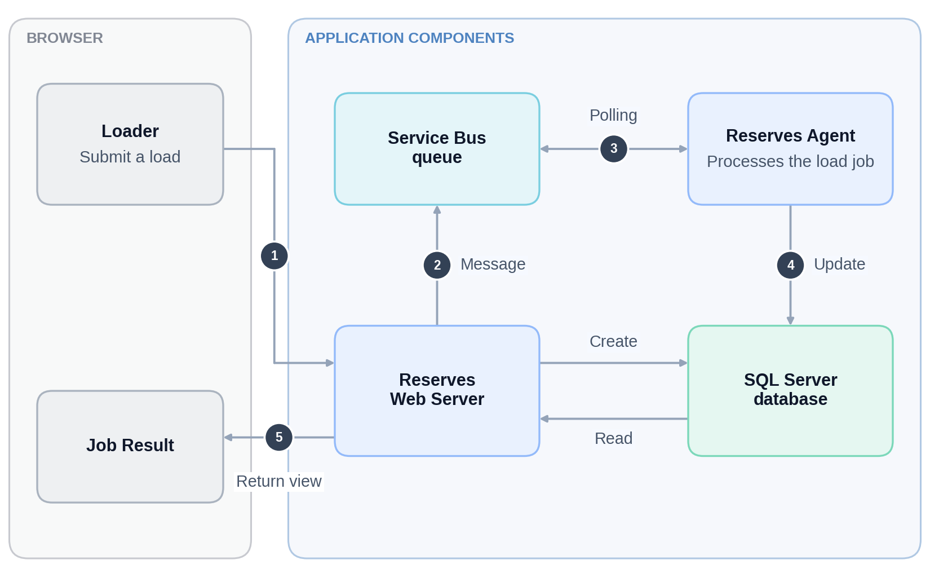
- A user submits a load from the browser.
- The Reserves Web Server creates the load job details in the SQL Server database and posts a message to the Service Bus queue.
- The Reserves Agent polls the queue.
- The Reserves Agent processes the load job and updates the database.
- The Reserves Web Server reads the job result from the database and returns the view to the browser.
Reserves supports Azure Service Bus as the messaging queue. Messages are notifications and status updates. The data that Reserves processes is stored in the SQL Server database, not in Service Bus. A message is held only until it is processed or expires.
Message content
Azure Service Bus carries short instructions and status updates between the Reserves Web Server and the Reserves Agent. For example, a message tells an agent that a job is ready to run, reports progress, or confirms that an agent is running. The data that Reserves reports on, loads, and exports stays in the SQL Server database and is not sent through Service Bus.
Each message is a small text message that identifies the work with internal reference numbers, such as a job or process ID, with a short description and the status. Two kinds of message carry additional job details: task messages include the settings of the process to run, and job progress messages include the job’s progress and log entries.
Messages are protected in transit and at rest, and they are short-lived. Each is removed once it is processed or when it expires.
These are requests and status updates. A report message asks an agent to run a report. It does not contain the report.
Messages sent through queries:
| What it does | Message | Queue | Contents |
|---|---|---|---|
| Starts a scheduled process | TaskReadyForExecutionMessage | Processing | Process ID |
| Asks an agent to run a report | ReportReadyForExecutionMessage | Reporting | User token, job ID, description |
| Asks an agent to run a data load Loader | ReadyForExecutionMessage | Loading | User token, job ID, description |
| Asks an agent to run an export | ExporterReadyForExecutionMessage | Exporting | User token, job ID, description |
| Asks an agent to run an on-demand task | OnDemandTaskReadyForExecutionMessage | OnDemand | User ID, task ID and type, process settings |
Messages sent through topics:
| What it does | Message | Queue | Contents |
|---|---|---|---|
| Reports job progress | JobProgressMessage | JobProgress | Job ID, user, owner, description, progress, status, agent name, log entries |
| Reports that an on-demand task has finished | OnDemandTaskResultMessage | OnDemand Results | Task ID, job ID, duration, status |
| Announces that data has changed | DataChangeMessage | DataChange | What changed: data source, object type and ID, and the action |
| Asks agents to report their status | RollCallMessage | Rollcall | Requester and time |
| Agent status reply | RollCallResponseMessage | Rollcall Response | Agent name, version, machine, uptime, and capacity information |
Message security summary:
| Topic | Details |
|---|---|
| Message payload and metadata | A JSON body. Reserves adds no custom message properties. |
| Business identifiers or data | Identifiers, such as job and process IDs, and descriptive fields appear in the body. On-demand task messages include the process configuration, and job progress messages include job log entries. |
| Encryption in transit | Connections use TLS: AMQP over TLS on port 5671, and HTTPS on port 443. Azure enforces TLS 1.2 or later on the service side. |
| Encryption at rest | Azure Service Bus encrypts stored data at rest by default, with Microsoft-managed keys. Customer-managed keys are available only on the Premium tier and are configured on the namespace. |
| Authentication | Reserves authenticates with a shared access key policy that has Manage rights. See section 'Azure authentication'. |
| Time to live | Rollcall and RollcallResponse topics and their subscriptions: 60 seconds (30 to 300 seconds is acceptable, never Unbounded). Queues: no expiry, which is the Azure default, because Reserves creates queues by name only. A queue created beforehand can have a 'time to live'. |
| Dead-letter handling | Dead-lettering on expiry is not enabled. The maximum delivery count is 10 and the lock duration is 1 minute, which are the Azure defaults. The processor renews the lock for up to 5 minutes and handles one message at a time. |
| Duplicate detection | Handled by Reserves for loader jobs and scheduled processes. |
| Deletion | A message is removed as soon as the Reserves Agent accepts it, not when the job finishes. An expired message is discarded unless dead-lettering on expiry is enabled. |
Queues and topics
Reserves uses queues and topics in each Azure Service Bus namespace. It creates a queue by name if the queue does not exist, using the Azure defaults. A queue created beforehand with other settings is used as it is.
| Entity | Type | Used for | Required setting |
|---|---|---|---|
| Processing | Queue | Scheduled process messages | (None) |
| Reporting, Loading, Exporting, OnDemand | Queues | Report, loader, exporter, and on-demand task messages | (None) |
| JobProgress, OnDemandResults, DataChange | Topics | Job progress, on-demand task results, and data change notifications | (None) |
| Rollcall, RollcallResponse | Topics | Agent status (rollcall) messages, are sent about every 30 seconds; the WSB Monitor collects them through its own subscription | Set the message 'time to live' to 60 seconds (30 to 300 seconds is acceptable, never Unbounded) on the topics and all their subscriptions, in every namespace, before using Reserves. If it is left unbounded, the namespace fills up and agents appear as not reporting, although jobs and scheduled tasks are not affected. |
Tier requirements
Azure Service Bus Standard tier is the minimum required. Premium tier is required only when security policy demands private connectivity. Microsoft provides private communication with Azure Service Bus through private endpoints, which are available on Premium subscriptions.
Why Standard tier is the minimum
Reserves messaging uses queues, topics, and subscriptions. Basic tier supports queues only, therefore anything that publishes or subscribes via topics requires the Standard or Premium tier. See the tabke below for details.
| Feature required by Reserves | Basic tier | Standard tier | Premium tier |
|---|---|---|---|
| Queues | Yes | Yes | Yes |
| Topics / subscriptions | No | Yes | Yes |
| Sessions, transactions, de-duplication | No | Yes | Yes |
| Message size | 256 KB | 256 KB | Up to 100 MB |
| Dedicated resource isolation | No | No | Yes |
Connectivity
Firewall rules are outbound only, but traffic flows in both directions. Reserves Web Server and Reserves Agent servers open all connections to Azure Service Bus, and Azure Service Bus replies on the same connections. Azure Service Bus does not initiate connections to Reserves servers, so no inbound rules are required. A stateful firewall allows the return traffic automatically.
Allow the outbound traffic as shown in the table below. The rules must apply from every Reserves Web Server and Reserves Agent server to each Azure Service Bus namespace.
| Port | Firewall rule | Protocol | Purpose |
|---|---|---|---|
| 443 (TCP) | Outbound | HTTPS | Management operations |
| 5671 (TCP) | Outbound | Advanced Message Queuing Protocol (AMQP) over TLS | Job message traffic |
Notes:
- Both ports are required: Reserves does not use AMQP over WebSockets, so opening port 443 alone is not enough to carry job messages.
- Reserves now uses Azure Service Bus. The on-premises Microsoft Service Bus has been deprecated by Microsoft.
- Azure Service Bus is a Microsoft-hosted service. The ports are fixed by Azure and cannot be changed on a namespace.
- If the firewall is stateless (it does not track connections), you must also set rules to allow return traffic from source ports 5671 and 443 to the servers’ ephemeral port range.
Example of a firewall rule:
- Namespace endpoint: 'https://reserves-example.servicebus.windows.net'
- Host to allow: 'reserves-example.servicebus.windows.net'
- Ports: 443, 5671
The following links to Microsoft's docuementation provide more information about the Azure Service Bus:
Browser Support
Reserves must be accessed through a modern web browser, and it is recommended that the latest-available version is always used. The Reserves application is tested continuously against the latest release of each browser.
The following browsers are supported:
| Browser | Recommmended version |
|---|---|
| Microsoft Edge | Latest release |
| Google Chrome | Latest release |
TLS and certificates
TLS 1.2 is required. TLS 1.0 and 1.1 can be disabled at the operating system level.
The following table shows the TLS requirements for each encrypted connection.
| Connection | Protocol | Requirement |
|---|---|---|
| Browser to Reserves Web Server | HTTPS | TLS 1.2. The IIS site binding must use a valid certificate issued by a trusted certificate authority. The certificate subject name or subject alternative name must match the host name that users enter, and the certificate must not be expired. |
| Reserves Web Server to Database | Encrypted SQL Server connection | TLS 1.2 |
| Reserves to Azure Service Bus | AMQP over TLS (5671) and HTTPS (443) | TLS 1.2 |
| Reserves Web Server and Reserves Agent to Planning Space | HTTPS | TLS 1.2 |
| Reserves Web Server to OIDC (OpenID Connect) identity provider | HTTPS | TLS 1.2 |
| Reserves Web Server to CCM | HTTPS | TLS 1.2 |
Certificates:
| Connection | Certificate required? | Issued by | Must the Reserves server trust it? |
|---|---|---|---|
| Database (SQL Server) | Only if encryption is on. | The SQL Server’s own certificate: public or internal certificate authority, or self-signed. | Yes, if encryption is on. |
| Planning Space (HTTPS) | Yes, a server certificate. | Public or internal certificate authority. | Yes. |
| OIDC identity provider | Yes, the provider’s HTTPS certificate. The web application validates tokens using the signing keys published by the provider. | Usually a public certificate authority. | Yes, so that Reserves can reach the provider’s metadata. The customer is not required to supply anything. |
| SAML (Security Assertion Markup Language) identity provider | SAML goes through the Planning Space server. Reserves does not handle SAML certificates. | Handled by Planning Space and the identity provider. | Not applicable to Reserves. |
| CCM | Only if the CCM URL is HTTPS. The sample configurations use the setting 'http://localhost/CCM'. | Public or internal certificate authority for the CCM site. | Yes, on every server that calls CCM: web, agents, and TaskLauncher. The CCM client uses default validation with no override. |
| Azure Service Bus | No customer certificate. Reserves authenticates with a shared access key. | Microsoft’s own certificate, from a public certificate authority. | Yes, but only through the standard Windows root store. |
Ports and protocols
This section shows how the Reserves components connect and lists the ports and protocols for each connection. In the diagram and tables, 'WAF' means web application firewall, 'TDS' means Tabular Data Stream, and 'SMB' means Server Message Block.
Overview
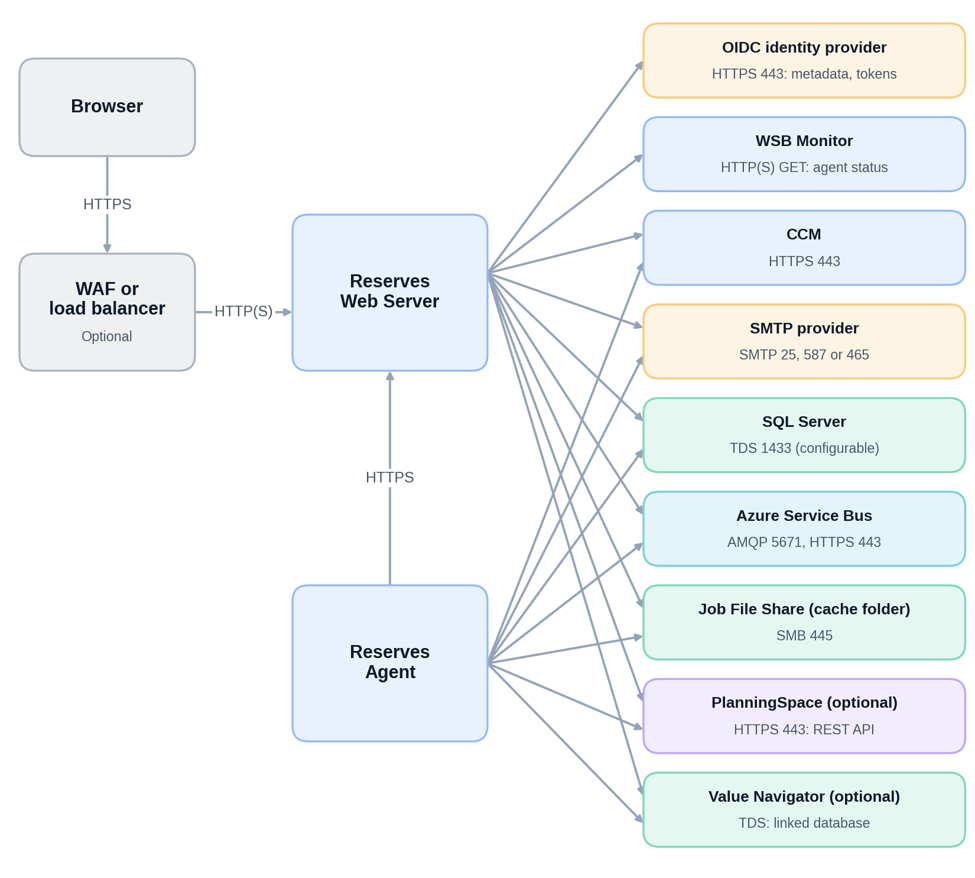
| From | To | Protocol | Port |
|---|---|---|---|
| Browser | Reserves Web Server, WAF, load balancer or AppGateway | HTTPS | 443 (set in the IIS binding and the WAF) |
| WAF or load balancer | Reserves Web Server | HTTP or HTTPS | 80 or 443 |
| Reserves Web Server, Reserves Agent | Database | SQL Server (TDS) | 1433 (configurable in the CCM database settings) |
| Reserves Web Server, Reserves Agent | Job File Share (cache folder) | SMB | 445 |
| Reserves Web Server, Reserves Agent | SMTP provider | SMTP | 25, 587 or 465 (configurable); Authenticated, with optional TLS |
| Reserves Web Server, Reserves Agent, TaskLauncher | CCM | HTTPS | 443 (configurable in the CCM URL) |
| Reserves Agent | Reserves Web Server | HTTP or HTTPS | 443 (as bound in IIS), with Windows credentials |
| Reserves Web Server | OIDC identity provider | HTTPS | 443 (metadata and tokens) |
| Reserves Web Server | WSB Monitor REST service | HTTP or HTTPS (GET: agent status) | As configured |
| Reserves Web Server, Reserves Agent | Azure Service Bus namespace | AMQP over TLS | 5671 |
| Reserves Web Server, Reserves Agent | Azure Service Bus namespace | HTTPS | 443 |
| Reserves Web Server, Reserves Agent | Planning Space server (optional) | HTTPS | 443 (the URL is configured, so the port may differ) |
| Reserves Web Server, Reserves Agent | Value Navigator database (optional) | SQL Server (TDS) | As configured (database prefix or linked server) |
Notes:
- For Azure Service Bus traffic direction and firewall rules, see the sub-section 'Connectivity' under 'Azure Service Bus'.
- The Reserves Web Server does not connect to the Reserves Agent directly. It publishes messages to Azure Service Bus for the Reserves Agent to consume, and the Reserves Agent connects to the Reserves Web Server over HTTPS.
- The ports shown are defaults. The actual ports depend on the customer’s IIS bindings, SQL Server, mail server, Planning Space, and CCM configuration. Reserves does not fix these ports. The SQL Server, SMTP, CCM, and Planning Space ports are set in configuration, and the browser and load balancer ports are set in IIS and the load balancer.
- The Reserves Web Server uses the Planning Space REST API for authentication and license lease, and the Reserves Agent uses it for data integration. Reserves has no direct connection to the Planning Space databases. It reads Planning Space data through the Planning Space API. The SMTP server, port, sender password, SSL setting, and certificate path are configurable.
Connection details
Each connection is described separately below. Arrows show the direction in which Reserves opens the connection.
Browser to Reserves Web Server
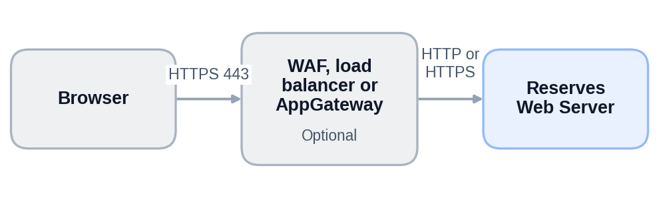
Protocol and port: HTTPS 443 from the browser to the WAF or load balancer. HTTP or HTTPS (80 or 443) from the WAF or load balancer to the Reserves Web Server.
Configured in: The IIS binding and the customer’s WAF setup. The port is not defined in Reserves.
Reserves Web Server and Reserves Agent to SQL Server
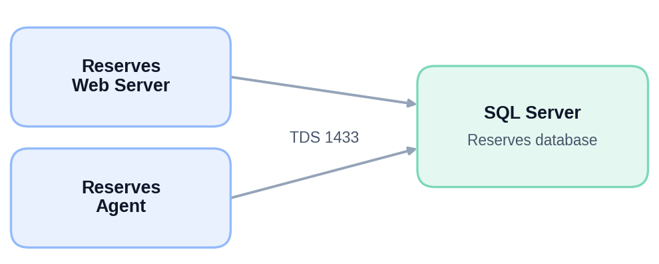
Protocol and port: SQL Server (TDS), 1433 by default.
Configured in: The CCM database settings, including the port. The Reserves Agent uses the same database settings as the Reserves Web Server.
Reserves Web Server and Reserves Agent to Azure Service Bus
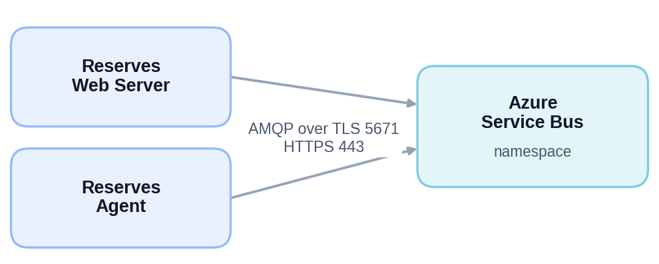
Protocol and port: AMQP over TLS on 5671, and HTTPS on 443.
Direction: Reserves opens every connection outbound. No inbound rules are needed. See Connectivity under Azure Service Bus.
Reserves Web Server to Identity Provider
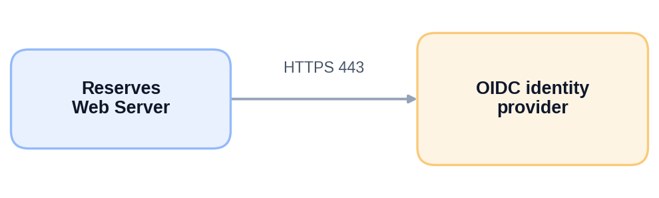
Protocol and port: HTTPS 443, for metadata and tokens.
Notes: The Reserves Web Server validates OIDC tokens directly. Examples of OIDC identity providers are Okta, Keycloak, Azure AD, and Planning Space. Reserves has no SAML code. SAML, where it is used, sits behind Planning Space or the OIDC provider.
Reserves Web Server and Reserves Agent to SMTP
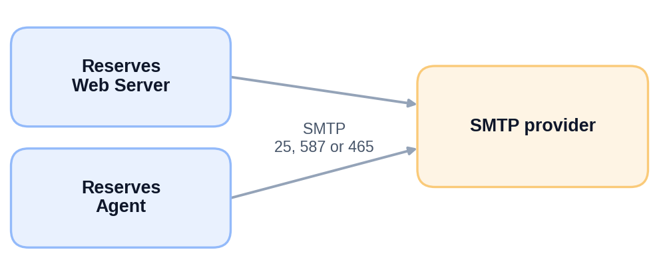
Protocol and port: SMTP on 25, 587 or 465. Authenticated, with optional TLS.
Used for: The Approval service on the Reserves Web Server sends email messages, and email jobs run on the Reserves Agent. This connection allows SMTP from every server that runs the Reserves Web Server or the Reserves Agent.
Configured in: SMTP server, port, sender password, SSL setting, and certificate path are configurable.
Reserves Web Server and Reserves Agent to Job File Share
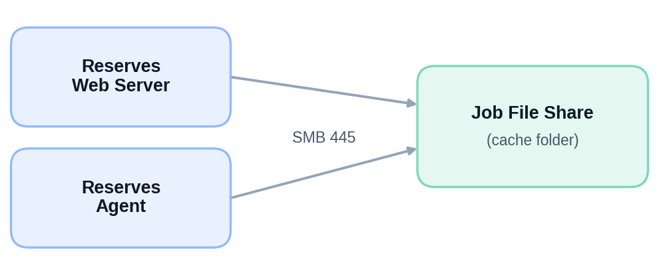
Protocol and port: SMB 445, to a UNC path.
Used for: Holds the jobs that the Reserves Web Server creates for the Reserves Agent to pick up. The Job File Share is required in the Advanced topologies.
Reserves Agent to Reserves Web Server
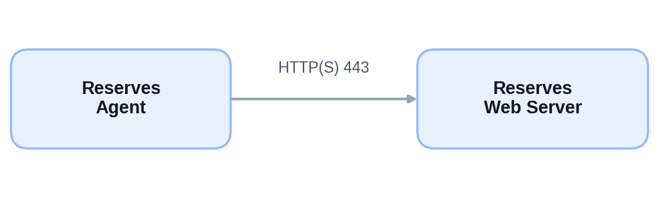
Protocol and port: HTTP or HTTPS, 443 as bound in IIS, with Windows credentials.
Used for: Instance reload, which posts to the ResultSet service on the Reserves Web Server. The approval service URL is set in the Reserves Agent configuration. If the Reserves Agent runs on the same server, the connection is a loopback.
Reserves Web Server, Reserves Agent and TaskLauncher to CCM
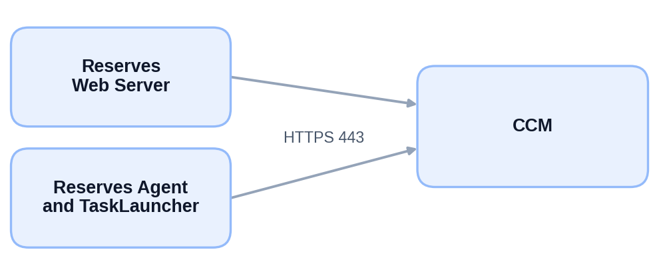
Protocol and port: HTTPS 443, configurable in the CCM URL.
Used for: Refreshing the configuration.
Reserves Web Server to WSB Monitor
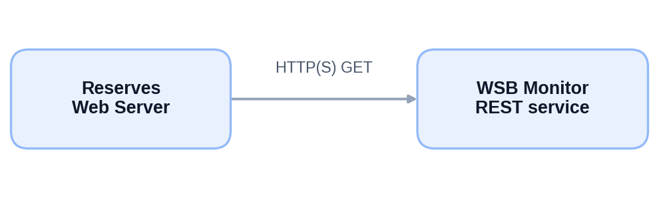
Protocol and port: HTTP or HTTPS GET, to read agent status.
Note: Agent status reaches the web application through rollcall messages in the Azure Service Bus, which the WSB Monitor collects.
Reserves Web Server and Reserves Agent to Planning Space (optional)
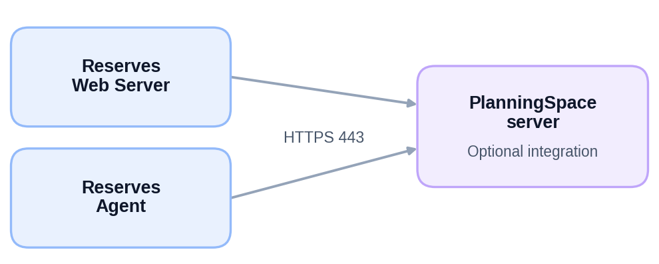
Protocol and port: HTTPS 443. The Reserves Web Server uses the Planning Space REST API for authentication and license lease. The Reserves Agent uses it for data integration, because the Planning Space loaders run in the agent.
Configured in: Planning Space URL, so the port may differ. The integration is optional.
Reserves Web Server and Reserves Agent to Value Navigator (optional)
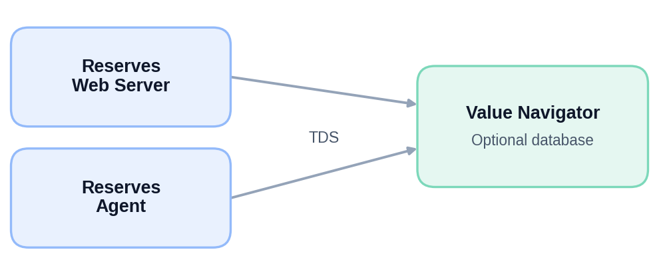
Protocol and port: SQL Server (TDS), 1433 by default.
Notes: This optional connection is used only when Value Navigator is linked. The loader reaches the Value Navigator database through a database prefix or a linked server.